27 July 2021

Password Generator for Ransomware

Ho

Kali ni nak share info penting.

Kini anda boleh menyelamatkan fail yang dijangkiti oleh Ransomware menerusi aplikasi yang disediakan oleh website ini. 


https://www.nomoreransom.org/en/index.html


23 December 2020

Semak Kebocoran IP


https://ipleak.net/

14 October 2020

How to Install App on Outdated IOS

 Assalamualaikum,

Hi readers.

So tonight i will teach you on how to install app on outdated IOS. i am using iPhone 4 IOS 10.3.3

Just follow steps below. 

Steps

1. Install 3uTools.
2. Connect iPhone to PC using USB cable.
3. Open 3uTools.
4. Bind iPhone account to 3uTools.
     - Click Apps Tab at top window.
     - Click Bind at right window.
     - Key-in Apple ID & password.
     - Click Bind.
5. Search interest apps. Eg: "Microsoft Swiftkey Keyboard".
6. Click Install.
7. On iPhone,
     - Open App Store,
     - Search apps for example "Eg: Microsoft Swiftkey Keyboard."
     - Click Install.
8. Done.


Some photos for guidance.

3uTools Interface

Bind button is in Apps tab, at right of window.

Key-in Apple Account and Password. Click Bind.


Successfully bind Apple Account to 3uTools


01 October 2020

Kodi Setup

Hi pembaca. 


Setelah install Kodi, kita dipersembahkan dengan settings default. 

Bagi memenuhi keperluan dan keinginan aku. Aku kongsikan setup Faveret aku.

1. Widgets sebelah kiri screen
  • Settings > Interface > Skin > configure skin... 
  • Seterusnya un-tick widgets yang tidak diperlukan 
2. Subtitle 
  • Kodi Settings > Add-ons > Search " Subtitles" > Pilih "Subtitles - OpenSubtitles.org" > Install 
  • Klik Subtitles-OpenSubtitles.org > Configure > Masukkan Username & Password. Jika tiada, boleh cipta dari laman web Opensubtitle.org
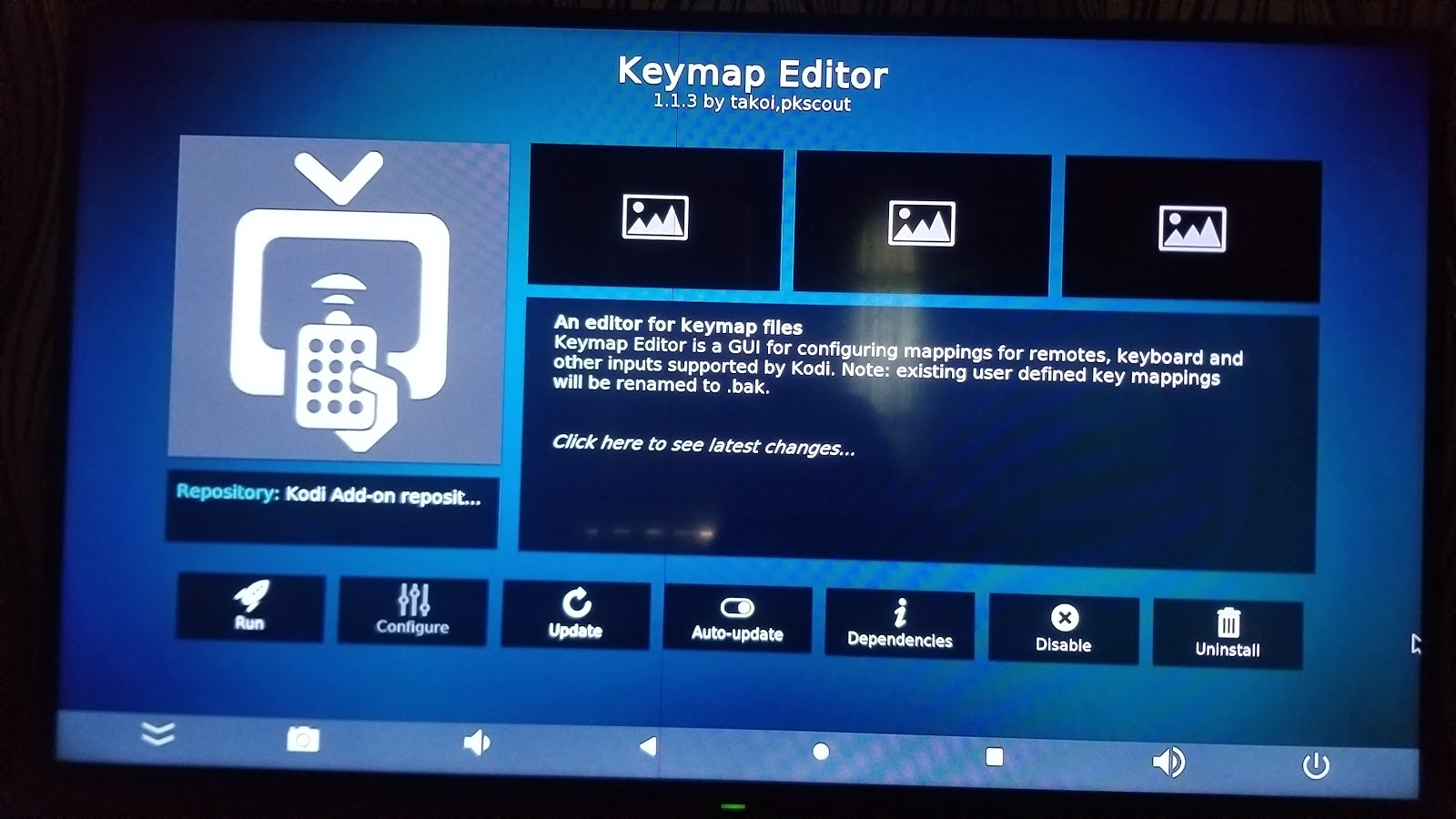
3. Keymap Editor
Kalau remote korang Takda butang Play, Pause, Stop, Forward, Reverse, dll. Korang boleh install Add-on Keymap Editor. 


  • Search "Keymap Editor" dan install. 
  • Install additional Add-ons dengan klik OK
  • Klik Keymap Editor > Run > Edit > Playback > Global > Play/Pause > Edit > Tekan butang yang korang nak set kat remote > Save. 
  • Ulang bagi kesemua butang korang nak setup. 
  • Selesai


05 August 2020

3ds break

Adoi.

Semalam aku transfer Homebrew app guna adaptop + usb type c adaptor. Guna la app X-Plorer. Sekali MC tak boleh baca. 

Aku format guna FAT32, 32k cluster. 
Kemudian download Luma3ds. Letak kat root MC. 
Alhamdulillah. Dah boleh boot semula.

Select + power = untuk masuk ke menu Luma3ds


04 August 2020

Selamat Datang Nintendo 3ds

Alhamdulillah
Setelah sekian lama dok survey, nak beli tak jadi. Akhirnya aku beli Nintendo 3ds LL jailbreak mod dari JP ke Us semalam. 

Tapi nasib kurang baik apabila kadang kadang ada error ARM19, dan kadang kadang screen jadi gelap. 
Mungkin masalah firmware, SD, atau NAND. 


08 July 2020

Blog update

Assalamualaikum

Lama tak update blog ni. 

Sibuk dengan kerja, balik rumah layan anak main Mario Galaxy kat Wii. 

Baru baru ni aku masukkan GameCube dalam Wii. 
Nanti aku cuba tulis update. 

15 February 2020


REM Copy semua dan paste ke notepad dan save sebagai Start.bat


@echo off
REM https://stackoverflow.com/questions/162291/how-to-check-if-a-process-is-running-via-a-batch-script

SETLOCAL EnableExtensions
set P1=iFAct.exe
set P2=OUTLOOK.EXE

:Program1
REM Check if iFAct is running
FOR /F %%x IN ('tasklist /NH /FI "IMAGENAME eq %P1%"') DO IF %%x == %P1% goto iFActFound
echo Starting iFAct
start /min "" "C:\Users\Public\ifact\3.0.0.5\iFAct.exe"

goto Program2

:iFActFound
echo iFAct already Running


:Program2
REM Check if Outlook is running
FOR /F %%x IN ('tasklist /NH /FI "IMAGENAME eq %P2%"') DO IF %%x == %P2% goto OUTLOOKFound
echo Starting Outlook
start /min "" "C:\Users\othmmohd\appdata\roaming\microsoft\internet explorer\quick launch\user pinned\taskbar\outlook 2016.lnk"

:OUTLOOKFound
echo Outlook already running

TIMEOUT 1

del "C:\Users\othmmohd\Documents\A_Emails_Attachments\*.png"
del "C:\Users\othmmohd\Documents\A_Emails_Attachments\*.msg"
del "C:\Users\othmmohd\Documents\A_Emails_Attachments\*.doc*"
del "C:\Users\othmmohd\Documents\A_Emails_Attachments\*.jpg*"
del "C:\Users\othmmohd\Documents\A_Emails_Attachments\*.ppt*"
del "C:\Users\othmmohd\Documents\A_Emails_Attachments\*.pdf"
del "C:\Users\othmmohd\Documents\A_Emails_Attachments\*.xls*"

timeout 2

14 December 2019

VitaCheat Basic Search


Post kali ni nak ajar macam mana aku search dan edit HEX code menggunakan VitaCheat 

1. Install Vitacheat kalau masih belum ada
2. Launch game 
3. Aku nak edit SP yang bernilai 5 tu.
4. Launch VitaCheat dengan Left Trigger + Right directional button
5. Masukkan nilai 5 (dec), tekan  Square kalau ada tulisan (hex) untuk tukar ke (dec) 
6. Pilih 8bit, 16bit, atau 32bit. 
7. Klik search. 


8. Kembali kepada game dengan tekan Right Trigger + Right directional button
9. Kurangkan atau naikkan nilai SP tu kepada nilai yang tak sama dengan nilai awal tadi SP 5. Contoh, upgrade skill atau beli/jual barang. Kat bawah ni, SP aku dah berkurang jadi 3.
10. Kembali ke VitaCheat, tukar nilai 5dec tadi kepada 3dec. Search sekali lagi. 


11. Ulang sampai tinggal 1, atau seminima mungkin. Senang kalau kurang dari 5.
12. Contoh aku dapat 2 shortlist
13. Tekan Triangle untuk show record list. 
14. Mula dari atas, tekan Triangle, dan edit nilai HEX. Tekan Cross untuk kembali & automatik akan save editing tadi. 
15. Kembali kepada game, semak baki. Adakala skrin tak refresh, korang kena keluar dari menu game, atau tukar halaman. Kemudian kembali ke screen tadi semula. 
16. Kalau tak berjaya, sangat rekomen untuk kembalikan nilai HEX yang diubah tadi kepada nilai asal. Game kemungkinan akan crash kalau tak tukar semula. 
17. Kalau berjaya. SP akan mengikut nilai editing tadi


18. Korang boleh save cheats list tadi dengan tekan Select untuk export ke  Cheat List. Dalam ni, korang boleh rename cheat, dan save dengan tolak analog kiri ke atas dan tekan Circle. 


Nota
1. Jangan search 2x, shortlist code kemungkinan akan terlepas carian kedua. 
2. Jangan guna fungsi Lock dalam Cheat List. Kadang kala, game auto save, Lepastu dia load nilai yang mustahil, game akan Crash. Korang kena padam fail cheat tu. Leceh nak cari. 


07 November 2019

Nintendo Wii

Hi semua,

2 bulan lepas aku ada beli konsol terpakai .
Harga dah lupa. Anggaran RM 400.
Siap hardware mod dan software mod.
Malangnya konsol ni tidak disertakan dengan kad SD.  Jadi aku tak tahu app apa yang dia guna.  Dan aku tak tahu macam mana nak guna fungsi jailbreak ni 100%.

I'm starting from scratch!

Ok.  Sedikit info tentang Nintendo Wii ni. 


  1. Software dan hardware mod 
  2. Ver. 4.3U


Sekian dahulu buat kali ini. 


31 October 2019

Saga FL Tukar Compressor

Assalamualaikum 

Baru baru ni compressor Saga FL aku dah kong.
Terus loose.  Nasib baik tak jem enjin.

Sempena kempen #BMF ni, aku usaha la cari workshop melayu islam sampai ke SP nu.  
Balik naik grab. Malam depa hantar kereta mai rumah.
Alhamdulillah aircond kembali sejuk.

Melayang RM990.
Hangpa tengok la kat bawah tu.
Hadoi.


New Post From Blogger Pro

Hi

Ini post menggunakan Blogger Pro app.

Pros
- Simple interface
- Nampak Labels
- Nampak Status Live atau Draft
- Save draft 

Cons
- Tak boleh save post offline


About this app

The full power of Blogger on your hands

Blogger Pro gives you the full power of Google's Blogger platform on the go.
You can manage your free blogspot blog from anywhere.

Features:

* Material Design
* Format and align text
* Add multiple pictures on posts and pages
* Create blog posts including viewing, updating and deleting
* Create blog pages including viewing, updating and deleting
* View comments and moderate them (Approve, Mark as Spam, Delete and Empty)
* View blog stats (Page views by Week, Month and Year)

Premium Features:
* Disable Ads
* Schedule post publishing
* Add location to posts
* Advanced editor features (Font, Font Size, Heading Type, Text Color, Text Backcolor)
* HTML Editor

Facebook:
https://www.facebook.com/bloggerproapp/

Google plus:
https://plus.google.com/u/2/communities/109951157754545240001

29 June 2019

Excel VBA : Search and Change Comments Box Using VBA

Assalamualaikum,

Jadi malam ni aku buat VBA untuk search and tukar comments box.

Enjoy
Zaiem


Sub changecommentbox2()


Dim rng As Range, cell As Range
Set rng = Range("D6:IW42")

For Each cell In rng
    cell.Select
    'Selection.ShapeRange.AutoShapeType = msoShapeRectangle
    If Selection.Comment Is Nothing Then
        'MsgBox "Has no comment"
    Else
        'MsgBox "There is comment in box"
        'Selection.Comment.Text "Ladida"
        
        
        Selection.Comment.Shape.Select True
        Selection.ShapeRange.AutoShapeType = msoShapeRectangle
        
    End If

Next cell

End Sub

22 March 2019

FASTEST AND EASIEST ROM PORTING TUTORIAL

Source : http://en.miui.com/thread-1286611-1-1.html


[GUIDE]FASTEST AND EASIEST ROM PORTING TUTORIAL


Hello readers, in this guide, i'll give you the easiest way to porting rom for your device,
i've broken my porting record by ported 5 roms in less than 1 hour using this method,
have enjoy and hope it'll works for you too

What you need ?
- Rom base (CM or AOSP)
- Rom port (any roms that you like to port and must be CM or AOSP based)
- Apktool (for compiling .apk and .jar files)
- Note++ (for editing .txt and .xml files)
- Winrar or 7zip (for extracting and repacking rom)
- dsixda's Android Kitchen, you really need this to Port MIUI, PAC, and Slimrom
- Open mind and never give up to trying

Rules
1. Find the rom port with similar CPU like your device, clock speed doesn't matter here,
the important is the number of CPU Cores, if your device is single core, find the single core rom,
dual-core with dual-core, etc
2. Forget about screen sizes(4, 5, or 7 inci), the important is screen DPI(pixels destiny)
you can port rom from tablet or devices that have bigger/smaller screen sizes
example
> LDPI & LDPI
> MDPI & MDPI
> HDPI & HDPI
> xHDPI & xHDPI
> etc
3. Same Android SDK version(Check in build.prop)
Example, you can port Android 4.4.3 using Android 4.4.2
4. GSM and GSM, CDMA and CDMA
Step by step

Extract booth of the roms(rom base and rom port)

> In rom port folder <
1. Delete all files and folders except "system" folder
2. Delete these folders and files in system
> tts
> usr
> vendor
> build.prop
3. Delete these folders in system/etc
> Bluetooth
> Firmware (if exist)
> Wifi
4. Delete these folders in system/lib
> hw
> modules
5. Go to system/framework
> Open framework-res.apk
> Go to res/xml
> Replace storage-list.xml with your rom base

> In rom base folder <
1. Copy all files and folders except "system" to rom port folder
2. Copy these folders and files in system folder to rom port system folder
> tts
> usr
> vendor
> build.prop
3. Copy these folders in system/etc to rom port system/etc
> Bluetooth
> Firmware (if exist)
> Wifi
4. Copy these folders in system/lib to rom port system/lib
> hw
> modules
Repack the rom then flash it in the recovery
Now the rom port should booted(to menu) now, not stuck on bootanimation anymore
if you still stuck on bootanimation, check bootclasspath in boot.img, unpack it,
and check in "init.environ.rc", use note++ to edit it, there's must be something miss there
If the rom doesn't boot to menu or stuck on manufacturer logo(LG, Sony, Samsung, etc),
find the same rom port from other devices. I've this experience while porting Liquid Smooth,
then i used other devices and it's booted

For porting MIUI Kitkat, you need to unpack boot.img from both roms, then do these
- Copy paste init.miui.rc from rom port to rom base ramdisk folder
- Open init.rc from both roms, then compare it, there's some line you need to be edited...

->Trouble Shooting

Now, to fix some issues in rom port, do these...

1. Information about rom
Open build.prop from booth of the rom then edit information just like the rom port
You can edit these lines in build.prop

# begin build properties
# autogenerated by buildinfo.sh
ro.build.display.id=
ro.build.date=
ro.build.user=
ro.build.host=
ro.product.name=
ro.product.locale.language=
ro.product.locale.region=
ro.cm.device=
# end build properties
#
# ADDITIONAL_BUILD_PROPERTIES
#
persist.sys.root_access=
ro.modversion= > replace with rom port
ro.cm.version= > you can delete this
ro.config.ringtone=
ro.config.notification_sound=
ro.config.alarm_alert=
ro.sf.lcd_density=
and the other lines relating information about rom

2. RIL
Replace these files in rom port with your rom base files
system/bin/rild
system/lib/libreference-ril.so
system/lib/libril.so
system/lib/librilutils.so
system/lib/libsec-ril.so
system/lib/libsecril-client.so
And add any files with "ril" in the name of file

3. Sensor
Replace these files in rom port with your rom base files
system/bin/sensord
system/bin/sensorservice
system/lib/libsensorservice.so
system/lib/libhardware.so
system/lib/libhardware_legacy.so

4. WiFi
Replace these files in rom port with your rom base files
system/bin/wifimac
system/bin/wpa_cli
system/bin/wpa_supplicant
system/lib/libwpa_client.so

5. Missing files
You have to copy the rest of files in base rom to port rom to make rom better,
but don't replace it if the files/folders was exist

6. Files can be replace in your ported rom using files from base rom
Bin
>adb
>dalvikvm
>debuggerd
>dhcpcd
>dnsmasq
>drmserver
>gdbserver
>glgps
>hostapd
>hostapd_cli
>ime
>ip
>ip6tables
>iptables
>logcat
>logwrapper
>media
>mediaserver
>mtpd
>ndc
>netcfg
>netd
>ntfs-3g
>ping
>ping6
>pppd
>radiooptions
>rild
>screenshot
>sdcard
>sensord
>sensorservice
>service
>servicemanager
>toolbox
>vdc
>vold
>wifimac
>wpa_cli
>wpa_supplicant

Lib
>lge-ril.so (for LG devices)
>libbluetooth_jni.so
>libbt-hci.so
>libbt-utils.so
>libhardware.so
>libhardware_legacy.so
>liblgehdmi.so
>libnfc.so
>libnfc_jni.so
>libnfc_ndef.so
>libreference-ril.so
>libril.so
>librilutils.so
>libsensorservice.so
>libwpa_client.so
>
>

7. Video streaming
> libstagefright.so
and all libs with "libstagefright" of the lib's name

Thank You.Please Hit Thanks! If You Like My Thread!

19 January 2019

03 December 2018

Saga FLX Bunyi Enjin Telah Dibaiki

Assalamualaikum

Akhirnya aku hantar kereta pi baiki.
Rupanya bunyi pelik datang dari
1. Water pump
2. Bearing compressor


Senarai bil
Servis Bearing, AC Gas, Compressor - RM200
Tukar Fan Belt, Timing belt 1 set - RM400
Tukar water pump - RM150

Upah - RM150

Total RM900

Puaih aih.
Malam tadi test drive sedap la.

21 November 2018

Mute speaker v2

Salam,

Dulu aku ada cipta code untuk Mute PC volume. Link.
Tapi ia hanya toggle dari Mute ke Enable sahaja.

Jadi dengan sedikit kajian, aku dapati


Chr(173) - Toggle audio volume
Chr(174) - Decrease audio volume
Chr(175) -  Increase audio volume

Jadi dengan mengulangi Chr(174), aku dapat Mute kan speaker PC.


Copy code kat bawah dan paste kedalam Notepad, Save as Mute.vbs


Set WshShell = CreateObject("WScript.Shell")
WshShell.SendKeys (chr(174))

08 November 2018

Hidden Folder


Salam dan selamat pagi.

Pagi ni aku update sikit code dari post aku sebelum ni di sini sebab ada ralat.
Update kali ni kita akan simpan file didalam System Volume Information.
Harap folder ni Windows tak delete la.
Use at your own risk.


@ECHO OFF
title Hide Folder
ECHO Created by Zaiem Othman. 8/11/2018.


if EXIST ".\System Volume Information" goto UNLOCK
if NOT EXIST ".\System Volume Information" goto MDLOCKER


:UNLOCK
echo Enter password to unlock folder
set/p "pass=> "

if %pass%== 1 goto REVEALFOLDER
if NOT %pass%== 1 goto FAIL

:FAIL
cls
ECHO Created by Zaiem Othman. 30/4/2015.
echo Invalid password
goto UNLOCK


:MDLOCKER
md "System Volume Information"
echo Private created successfully
attrib +h +s +a ".\System Volume Information"
start explorer ".\System Volume Information"
goto End


:REVEALFOLDER

attrib +h +s +a ".\System Volume Information"
start explorer ".\System Volume Information"
goto End


:End

31 October 2018

eBuku pertama dari Google Play Books

Assalamualaikum.

Cuma nak kongsi eBuli pertama aku beli seumur hidup ni. Huhu

Buku bertajuk 100+ Ideas for Supporting Children with Dyslexia.
Harga RM 32.39 shj

18 October 2018

Tak boleh set default program

Salam.

Adakalanya Windows jadi pening mungkin sebab default program asal dah di padamkan atau kau tersalah set default program, lepas tu kau nak set semula default program Windows tak bagi pilihan.

Kau kena set semula registry.

Buka Regedit.exe
Navigate ke address kat bawah.

\HKEY_CLASSES_ROOT\Applications\notepad++.exe \shell\open\command\

Kemudian edit Default address.
Selesai.